sabato 22 gennaio 2011

Setting up Animal Logic MayaMan to work with Maya 2011 on Windows

MayaMan is a plug-in which allows Maya users to render scenes with Renderman compliant renderers. The latest release for Windows x64 (3.0.08) was developed with Visual C++ 2010, so it's important to check if our pc has the Microsoft Visual C++ 2010 Redistributable Package installed.
The Microsoft Visual C++ 2010 Redistributable Package installs runtime components of Visual C++ Libraries required to run applications on a computer that does not have Visual C++ 2010 installed.
The package can be downloaded here.
If we don't have an installer, we have to install the plug-in manually:

  1. Extract the file wherever you want (ie: C:\Program Files\Animal Logic\)
  2. Specify some environment variables that affect MayaMan's behaviour. Read here how to do that:

    variable nameMAYAMANROOT
    variable valuepath\to\mayaman3.0.08_64

    variable name: MAYA_PLUG_IN_PATH
    variable path:   %MAYAMANROOT%\plugins\2011

    variable name: MAYA_SCRIPT_PATH
    variable path:   %MAYAMANROOT%\mel

    variable name: XBMLANGPATH
    variable path:   %MAYAMANROOT%\mel
  3.  
  4. Run Maya and load the plug-in.

Best regards.

Automatizzare download dei sottotitoli da µTorrent

A partire dalla versione 2.2, µTorrent permette di settare nelle opzioni generali un comando automatico da eseguire alla fine di ogni download. Come si vede nell'immagine a sinistra, dopo anni di richieste, questa possibilità è offerta in modo globale per ogni download. Nella scheda Avanzate - Esegui programma c'è un campo di testo con la possibilità di impostare un comando da eseguire quando termina il download .

E' possibile utilizzare questa opzione per automatizzare il download dei sottotitoli di serial tv da un sito tipo italiansubs.net. In particolare la utilizzo con un programma che ho scritto, JSubs, che serve  proprio per il download di sottotitoli. Se non ho JSubs che gira in background con il suo timer e non ho voglia di utilizzare il tasto destro del mouse per scaricare i sottotitoli, posso ricorrere a questa possibilità.

Su Windows, basta inserire questa riga nel campo di testo:

C:\Programmi\JSubs\JSubsCMDL.exe --started-from-file "%D\%F"

modificando ovviamento il percorso alla cartella (C:\Programmi\JSubs\)in cui è stato scompattato JSubs. JSubsCMDL.exe è la versione da riga di comando della GUI ed è usato essenzialmente per il menù contestuale, è spiegato un po' meglio qui. JSubsCMDL.exe è in grado di controllare se il file è un video e se è un serial tv, quindi è l'ideale per questo compito.
Se i sottotitoli non vengono trovati, il programma chiede con message box cosa fare. E' anche possibile far eseguire le operazioni in modo del tutto "silenzioso", utilizzando questa stringa:

C:\Programmi\JSubs\JSubsCMDL.exe --silent --started-from-file "%D\%F"

Se i comandi non dovessero funzionare (a me funziona tutto), si può creare nella cartella di JSubs un file uTorrent.bat
@echo off
if "%*" == "" goto error
echo "%*"
cd "C:\Programmi\JSubs"
java -jar JSubsCMDL.jar --started-from-file "%*"
:error
echo Indicare il percorso al video
echo uso: uTorrent percorso/video
:end
echo.
echo Operazione eseguita con successo.
modificando, come prima, il percorso della cartella di JSubs. La riga da utilizzare in questo caso sarà:

C:\Programmi\JSubs\uTorrent "%D\%F"

Lo svantaggio di questo metodo è che il file bat eseguito da µTorrent apre un prompt dei comandi durante il download dei sottotitoli. Per far girare tutto in modo invisibile bisognerebbe utilizzare uno dei metodi descritti qui, su stackoverflow. In particolare lo script invis.vbs funziona molto bene:

wscript C:\Programmi\JSubs\invis.vbs C:\Programmi\JSubs\uTorrent.bat %D\%F

Su Ubuntu l'operazione è più noiosa e complessa: con wine va installato JRE di Sun per Windows (a sinistra). Il JRE si installerà nella cartella di wine e java sarà disponibile per tutti i programmi che ne avranno bisogno. Il comando da usare con µTorrent  in questo caso è:


H:\Programmi\JSubs\JSubsCMDL.exe --started-from-file %D\%F

Va detto che, su Ubuntu 10.04, la versione 2.2 di µTorrent non funziona, va scaricata l'ultima beta disponibile.

Saluti

giovedì 6 gennaio 2011

Mozilla - Dynamically filling menus

I'm updating a toolbar extension for Firefox I wrote last year. I have 3 toolbarbuttons with menupopups filled dynamically. A Javascript function called by an onpopupshowing handler retrieves the contents from the internet, builds the menuitems and adds them to a menupopup at runtime. Obviously the function depends on the remote server response speed and on my internet connection. In addition, the function takes a little time to manipulate the data. In short, in my case, the process of retrieving contents and filling a menu takes about half a second, so, if I click on the toolbarbutton, a very little white rectangle is showed for a split second before the menu appears.
I'd like to delay the menu appearence but it seems quite difficult.
According to Mozilla, if we have nothing to show on a menu, we should follow the standard used in Firefox: show a single disabled item with an "(Empty)" label. If filling the menu takes a noticeable amount of time, we should not make Firefox (and users) wait for it to fill up before displaying anything. It's best to show an item with a throbber image (chrome://global/skin/icons/loading_16.png) so the user knows there's something going on, and asynchronously fill its contents.
I'm still wondering if it's possible to delay the menu appearence.

Best regards.

mercoledì 5 gennaio 2011

Parsing HTML string to get links in Javascript

Recently I needed a Javascript function to retrieve links from a HTML string. Unfortunately I couldn't use third party powerful tools like jquery, so I thought to use RegEx.
Let's assume we have a HTML page like this:
<html>
    <body>
        <a href="google.com" title="Google Site">Google</a>
        <a href="mozilla.com" title="Mozilla Site">Mozilla</a>
        <a href="blogger.com" title="Blogger Site">Mozilla</a>
    </body>
</html>
This page contains links to Google, Mozilla and Blogger. How can we get the links from the HTML content?
<script language="JavaScript" type="text/javascript">
function getLinks() {
    var html = "<html> \
                <body> \
                <a href=\"google.com\" 
                   title=\"Google Site\">Google</a> \
                <a href=\"mozilla.com\" 
                   title=\"Mozilla Site\">Mozilla</a> \
                <a href=\"blogger.com\" 
                   title=\"Blogger Site\">Blogger</a> \
                </body> \
                </html>";

    var links = [];

    html.replace(
     /[^<]*(<a href="([^"]+)" title="([^"]+)">([^<]+)<\/a>)/g, 
     function() {
        links.push(Array().slice.call(arguments, 1, 5));
    });

    alert(links.join("\n"));
}
</script>
The getLinks() function retrieves the links from the HTML content and puts them into an array. "The slice method creates a new array from a selected section of the links array". Some useful informations about the slice method here.


So at the end we have an "array of array". If we want to retrieve a single element, we can call it as links[x][y], where x is the row and y is the column.
For example, let's assume we want to extract some information from the first link:
alert("First link (Google):\n" +
      "Destination anchor: " + links[0][1] + "\n" +
      "\"title\" attribute: " + links[0][2] + "\n" +
      "Source anchor: " + links[0][3]);
The function has several limits: for example it's case sensitive and depends on the A element. In the case above, the href and title attribute are set, but if we have an A element like this:
<a href="google.com">Google</a>
without the title attribute, the function won't work. In that case, we should modify the regex in this way
html.replace(
     /[^<]*(<a href="([^"]+)">([^<]+)<\/a>)/g, 
     function() {
        links.push(Array().slice.call(arguments, 1, 4));
    });
Best regards.

lunedì 3 gennaio 2011

One year old

The 50th post is all dedicated to the first birthday of this blog. One year ago I started writing this little diary with no expectation, but in the hope to give back to internet a bit of what I was in receipt of. How many times do we earn money, create something or fix problems simply browsing the internet? We digit our keywords and someone somewhere helps us. The idea was to be the nth someone, one of many, to expand that marvelous microcosm of the internet community, the best form of cohabitation I have never seen, even though it's not free from problems. So I hope not to have written too much crap.
I don't want to miss the opportunity to thank the visitors ( I didn't expect so many ) and who took the trouble to mail me. Thanks a lot.
This post is planned for January, 3rd 2011 and it isn't too late to wish you a happy new year.

Best regards.

martedì 28 dicembre 2010

Problem with Google Images and Firefox - 2

By browsing the internet, my brother Massimo found out the solution for the problem described here. This problem is due to the router.
As explained here: 

"When image results are to be displayed, Safari and Firefox make multiple simultaneous connections to the host to retrieve them. This is usually faster than downloading one and moving on to the next and on and on."
...
"Some consumer-level SPI firewalls misinterpret the attempt to open that many simultaneous connections to one server as a "SYN flood" and block the traffic. Not good, especially when the connections are being made from your machine to an outside host, so the firewall is effectively blocking you from perpetrating what it thinks is a SYN flood."

The SYN flood attack is visible in the router logs. The solution:

"If your router allows configuration of its SPI firewall, you may be able to solve this problem if it has a setting labeled something like:

Maximum incomplete TCP/UDP sessions number from same host

On those routers, this setting is often set to a default of "10"; simply increasing this value to a much higher value - many have had good luck with "20" - will allow accesses to work as desired and will also allow some room for possible future expansion in the number of simultaneous queries made.

If your router does not offer such a setting, there's no solution other than to disable the firewall.

Note that any operating system - Linux, Solaris, even perhaps Windows 7 - could trigger the same problem. You can even generate the same issue in Windows XP by applying "speed tweaks" such as this."

domenica 19 dicembre 2010

Modeling a Cylon Raider - Central part

Yesterday I modeled the central part of my Cylon Raider. After the wings, this is the last part.

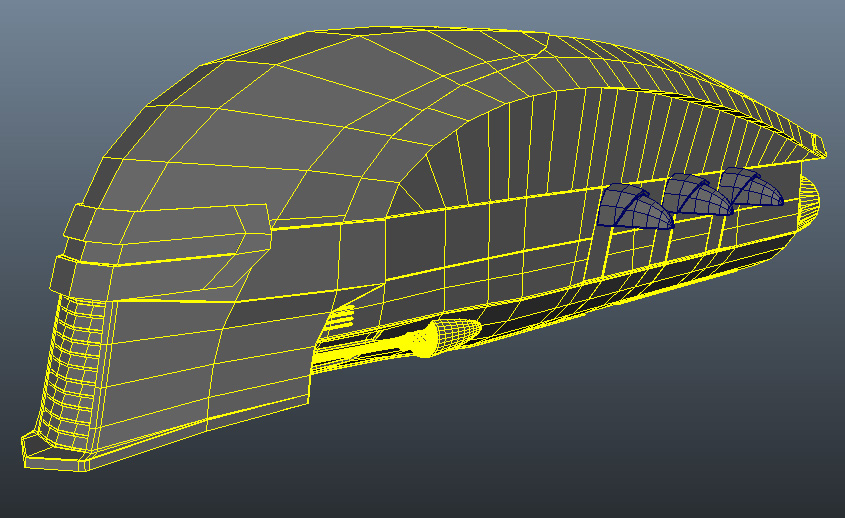
I decided to use a poly sphere to start sculpting the geometry. I chose to decrease the subdivisions axis to 12 and the subdivisions height to 8. At the end of the process it will be evident that these values are probably too low. I wanted to sculpt the piece as fast as I could, so I didn't need too much geometry. The sphere has been rotated by 90 degrees about X and Y. After that, I deleted the part filled with the yellow cross-hatching.


The "fuselage" is symmetrical, so it's possible to model half of it and then mirror on X axis. I decided to start the modeling process from the top  of the central part. The geometry has been scaled on the Y axis. The low poly geometry comes in very handy because it's possible to sculpt the shape easily. Obviously, it's possible to add some more geometry inserting edge loops.

The shape was finished extruding the border edges. I decided to extract some parts to handle the model.  I added some edge loops to  reinforce the hard edges and not to have weird results when  I'll smooth the shape The image on the left is the low poly model. It has to be smoothed but it's quite similar to the original one.


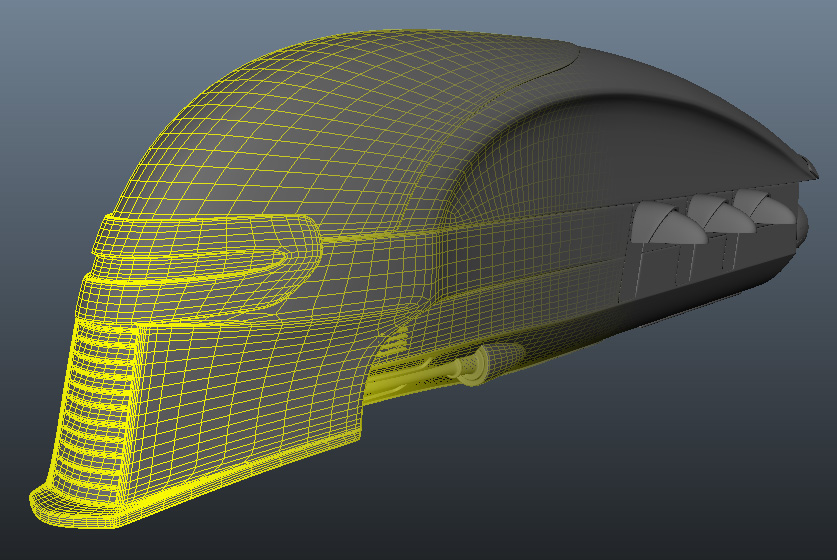
This is the final geometry. As said before, I understimated the shape, because I wanted to model it quickly, so I needed to smooth two times the low poly model. The result is good but this is piece of geometry is quite heavy. It should be retopologized, but I have not much time now and texturing the model will be a time-consuming process, so, probably, I will let the model melt my cpus.


Best regards.

giovedì 2 dicembre 2010

Shelf buttons for loading and unloading Maya plugins

Shelf buttons for loading and unloading Maya plugins are very useful and, as a matter of fact, I use them every day.  I'd want to clarify that this method is not mine, but I don't remember where I read it, so I cannot give notice of copyright nor the right credits. I hope to correct this post as soon as possible.

Loading the plugin: we can copy (fixing the path to the plugin) the following lines to the Script Editor, select the text and drag it to the Shelf Bar:
{
    string $pluginFile = "c:\\path\\to\\plugin.mll";
    loadPlugin $pluginFile;
}
Unloading the plugin: same as above.
{
     string $pluginFile = "c:\\path\\to\\plugin.mll";
     if ( `pluginInfo -query -loaded $pluginFile` &&!
          `pluginInfo -query -unloadOk $pluginFile` )
         file -f -new;
     unloadPlugin plugin.mll;
}

Best regards.

mercoledì 1 dicembre 2010

Modeling a Cylon Raider - the wings

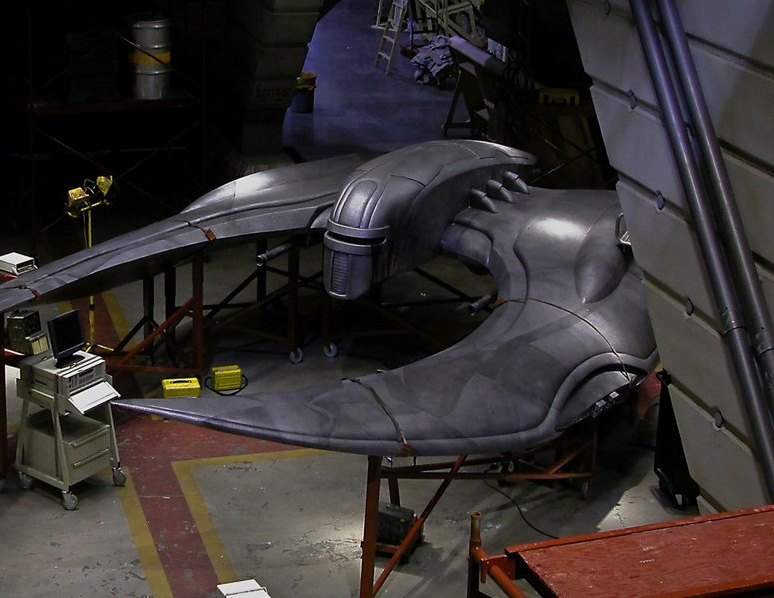
I have a couple of free days, so I want to start to model my last homage to Battlestar Galactica, one of my favorite TV Shows.
After the Viper MK II and the Cylon Centurion, it's the turn of the Cylon Raider.

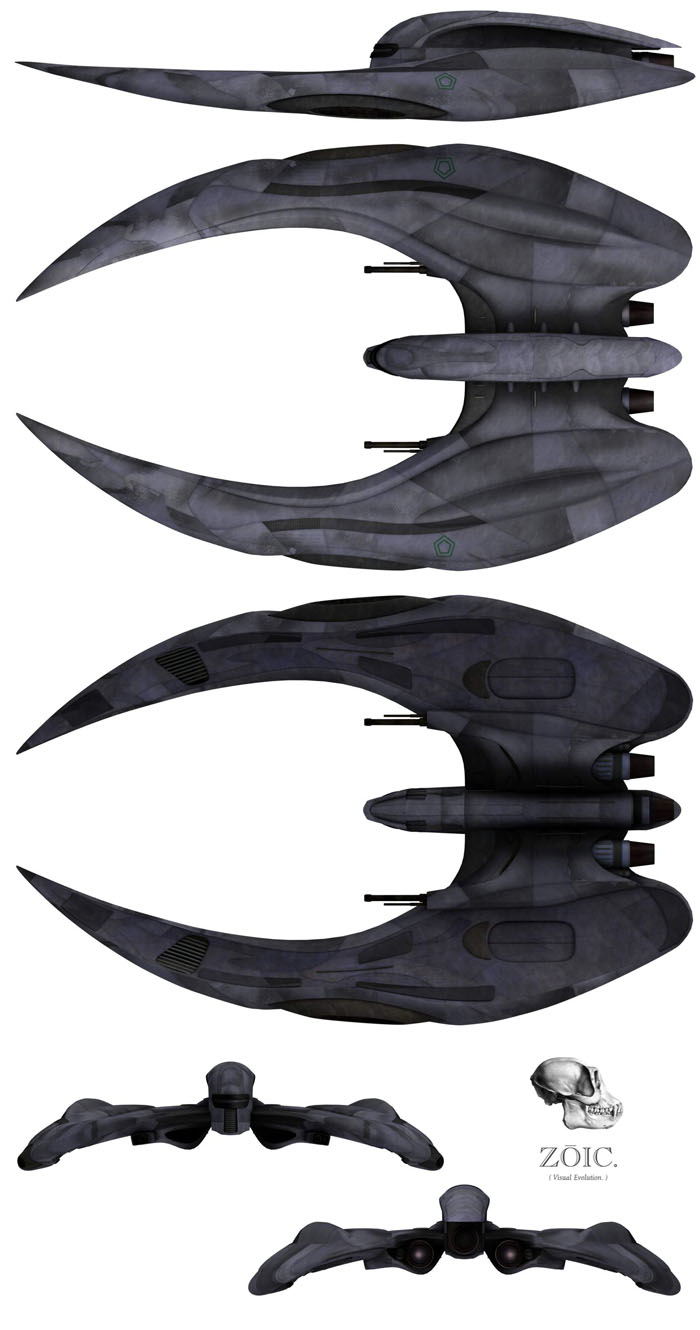
I've found this blueprint as reference, so the first step is to crop all of the images in Photoshop. I will have four different images at the end of the process (top, left, bottom and rear) to import into Maya 2011 as image planes. It's important to use horizontal and vertical guides in Photoshop to resize correctly the images, because the references must have same dimensions.


First impressions: the original model is fantastic, I love the design and the final look, this fighter is really awesome. I don't know the authot but I'd like to pay him a compliment. It is interesting to notice that the model is composed of 4 parts: the wings (I can model one of them and then mirror it), the engines, the weapons and the central part. The fighter hasn't a linear design, but it's possible to break down it into 4 parts to ease the modeling process.


I decided to get started from the wings. I think the wings are the funniest and the most difficult part of this model. I'm using traditional methods to model the wing, nothing fancy: I get started from a box, extruded it a lot of times, added some edge rings and moved the vertices to match my reference images. I'd want to create a low poly model, because I'd like to animate a fight between the viper and the raider and obviously the raider will be destroyed.


Anyway, during the modeling process, I prefer to smooth the mesh to see if it's correct and perfectly rounded. This step helps me to notice that the bottom needs some correction.

In the meantime I decided to use the references as texture, so, in a next article, I'd like to share my method to project the images from a camera to create a new texture. First of all I will create the UV maps, then I will project the reference images from a given camera (unfortunately, it's not possible to use an orthographic one).


Best regards.