sabato 7 agosto 2010

Problem with Google Images and Firefox 3.6.8

EDIT: Solution here.

In my holidays house I cannot search Google Images. Recently Google changed the design of its image search engine and I have been experiencing a problem with Firefox and other browsers on Ubuntu and Windows.
If I try to search Google Images, Firefox hangs loading the results, no image is shown at all and Google related sites are unreachable for a little while (it's still possible to browse other sites) :


I think it's impossible to revert Google Images to its old design, so I  thought to use Google Mobile to search images because I can browse it with my smartphone without problems.
It's quite easy to use Google Mobile to search images: we can use a string formatted in this way:

"http://www.google.com/m/search?site=images&q=" + search terms

for example:

http://www.google.com/m/search?site=images&q=firefox+ubuntu

I wrote a simple search plugin for the Firefox Search bar to search images with Google Mobile.

Copy this text:


<OpenSearchDescription xmlns="http://a9.com/-/spec/opensearch/1.1/"
xmlns:moz="http://www.mozilla.org/2006/browser/search/">
<ShortName>Google Mobile Images</ShortName>
<Description>Search images with Google Mobile</Description>
<InputEncoding>inputEncoding</InputEncoding>
<Image width="16" height="16" type="image/x-icon">data:image/x-icon;base64,iVBORw0KGgoAAAANSUhEUgAAABAAAAAQCAYAAAAf8/9hAAAAAXNSR0IArs4c6QAAAARnQU1BAACxjwv8YQUAAAAgY0hSTQAAeiYAAICEAAD6AAAAgOgAAHUwAADqYAAAOpgAABdwnLpRPAAAA09JREFUOE8lk21sFFUYhd+ZKUaaStsfmBhAG6OIYGNM0G671CrExjYaMAhYEyAR5Y/48csPXI20bLUoUCxWWvxszEqRYFttYYMWFdBKmhaIRW2lX6JUdmm722ZhO7vz+M7448y9c+ee8573zL0iItgp6B4YJW9jiIxHPqP60FnSpEjGJjhRUkSfIcyYJmndmxaThL6P69zlSsoGB1hVdRRZF8bc1M2cp77lz3/i+iFF4tc+LmVlemTHsEgr2RWISgbDpgooF9u2uW1LB7KpC9nci1T8QNVX5zxl1WC4tJSkGKQsIWkYTIpFREWGXAdOWhV0kz/Qibn+J8zNXZhPnmTdrh5X2tXnwupVTGtFlJRW8pSOfyu537RcB65Cmsrmc8jqMBlPn8Z84jsqart0VS1cg5/vXMSPN11H68JcOvJy6c6ZxYjad7ORgZErXgZjsQSLtrQjjx9jzvow4d6L3npD634WvJiHvF+AVV+M1PmZXXMfRc/ks2NJNnLHhk841HleTThMxJN8enyQ/tErXvXg0Qak8i6sRj/WviKkvkBRiLFH53UlGG8tR+auPUDOyg9Z/kKI7U2d/6emvR/v/wXz5VuQ/fciDUpsLMDYu8yD7PZhvFOsAverg4om5q/5nOvLPyb34X0MjcVwHIeR6EUWNj6G7M3H/KBQ4de5D/M9P8buYkwVkBofcmvZLnwbPmLtG208X/s9vf3jnn1Hn5F4hNIDz2LszFfrWln796ACskOxXRE6dobIuJc3M5N9jF1oYbC3nqtTl71fOKMnrSz0nIosVrJWrPVr9ULkbRUMKty/OPXvGXpafAy1ZPJXuzB62OR882Ji0T+8TH4bG+aG6hIlF2K9uwyzRisHtf9timv2NN2hAia+0aN6ysQ+kUmiczaXDwoDLeVeHm6ut+9Zoz0vRXZqC9XFzNq2AuN1FYhHB/m9aR5XwznEwlnE27OZbMtm+ut5XPrybkhOkbAdFgTLlahhBh/UUV28+QDymjqxUw5DRzYS/SKLydYbibXN9cixgzczfjLgZdN8+gjWS/dgVOl5qNRW3MpbFa+ucG+kXufpKJFTASY6VhJrfUjHR0n01JG0E5wdGWT+K2VKWIoZUHLArazhbVUnyv0Pap2Kdp9xgc4AAAAASUVORK5CYII=</Image>
<Url type="text/html" method="GET" template="http://www.google.com/m/search?site=images&amp;q={searchTerms}" />
</OpenSearchDescription>

and paste into your preferred text editor, save as gm.xml in

~/.mozilla/firefox/xxxxxxxx.default/searchplugins

Restart Firefox and the plugin will be added to pre-loaded search engines:


It's possible to use it on windows too (Shortcut Win + R --> %appdata%\mozilla\firefox\profiles).

A best solution comes from my brother, Massimo: It's possible to bypass the problem using an anonymous web proxy like anonymouse.org. A bookmark with a link like this:

http://anonymouse.org/cgi-bin/anon-www.cgi/http://www.google.com/imghp

speeds up the process and works fine.

Best regards

venerdì 6 agosto 2010

Microsoft Wireless Comfort Keyboard 1.0a on Ubuntu Lucid Lynx 10.04

Many of the multimedia keys of my Microsoft Wireless Comfort Keyboard 1.0a are not predefined on Ubuntu Lucid Lynx 10.04


Unfortunately  KeyTouch doesn't work for me. Fortunately there are a number of good tutorials to fix this problem. I followed this one:


and it's a very good howto that I don't want to copy here. I want to report here my own parameters to fully take advantage of my keyboard.
Pressing  my multimedia keys one by one and using sudo dmesg -c in a gnome-terminal, I discovered the scancodes from outputs like this:

atkbd.c: Unknown key pressed (translated set 2, code 0xe002 on isa0060/serio0).
atkbd.c: Use 'setkeycodes e002 ' to make it known.

Now, before going on, a little explanation: my keyboard has a special button, called "F Bloc" (Function blocks), to enable/disable particular functions for F1, F2...F12  keys and I want to fully take advantage of it.
Here it is, my /etc/rc.local, you can see the new functions
for F1, F2...F12  keys in case of F Bloc disabled :

#!/bin/sh -e
#
# rc.local
#
# This script is executed at the end of each multiuser runlevel.
# Make sure that the script will "exit 0" on success or any other
# value on error.
#
# In order to enable or disable this script just change the execution
# bits.
#
# By default this script does nothing

setkeycodes e00b 180 # Zoom in
setkeycodes e011 181 # Zoom out
setkeycodes e005 182 # Messenger
setkeycodes e015 183 # Calendar
setkeycodes e016 184 # Disconnect
setkeycodes e073 185 # Favorites 1
setkeycodes e074 186 # Favorites 2
setkeycodes e075 187 # Favorites 3
setkeycodes e076 188 # Favorites 4
setkeycodes e077 189 # Favorites 5
setkeycodes e078 190 # Favorites - Star
setkeycodes e03b 191 # Help  -> F1
setkeycodes e008 192 # Undo  -> F2
setkeycodes e007 193 # Redo  -> F3
setkeycodes e03e 194 # New   -> F4
setkeycodes e03f 195 # Open  -> F5
setkeycodes e040 196 # Close -> F6
setkeycodes e041 197 # Reply -> F7
setkeycodes e042 198 # Fwd   -> F8
setkeycodes e043 199 # Send  -> F9
setkeycodes e023 200 # Spell -> F10
setkeycodes e057 201 # Save  -> F11
setkeycodes e058 202 # Print -> F12
exit 0

after that, I added the missing keysyms to the right keycodes in /etc/xmodmap.conf:

clear Mod1
add Mod1 = Alt_L
clear Mod4
add Mod4 = Tab
clear Mod5
add Mod5 = Alt_R
keycode 188 = XF86ZoomIn NoSymbol XF86ZoomIn
keycode 189 = XF86ZoomOut NoSymbol XF86ZoomOut
keycode 190 = XF86Messenger NoSymbol XF86Messenger
keycode 191 = XF86Calendar NoSymbol XF86Calendar
keycode 192 = XF86LogOff NoSymbol XF86LogOff
keycode 193 = XF86Launch0 NoSymbol XF86Launch0
keycode 194 = XF86Launch1 NoSymbol XF86Launch1
keycode 195 = XF86Launch2 NoSymbol XF86Launch2
keycode 196 = XF86Launch3 NoSymbol XF86Launch3
keycode 197 = XF86Launch4 NoSymbol XF86Launch4
keycode 198 = XF86Launch5 NoSymbol XF86Launch5
keycode 199 = XF86Support NoSymbol XF86Support
keycode 200 = Undo NoSymbol Undo
keycode 201 = Redo NoSymbol Redo
keycode 202 = XF86New NoSymbol XF86New
keycode 203 = XF86Open NoSymbol XF86Open
keycode 204 = XF86Close NoSymbol XF86Close
keycode 205 = XF86Reply NoSymbol XF86Reply
keycode 206 = XF86Forward NoSymbol XF86Forward
keycode 207 = XF86Send NoSymbol XF86Send
keycode 208 = XF86Spell NoSymbol XF86Spell
keycode 209 = XF86Save NoSymbol XF86Save
keycode 210 = XF86Launch6 NoSymbol XF86Launch6

Note 1: If I put xmodmap.conf in my home directory, it doesn't work.
Note 2: I added some extra commands at the top of the file (clear ..., add ...): clear is used to remove all entries in the modifier map for the given modifier,  where valid name are: Shift, Lock, Control, Mod1, Mod2, Mod3, Mod4, and Mod5
add is a command to reassign all  keys containing the given keysyms to the indicated modifier map. 
If I don't use these commands, some functions keys (F5, F7, F8, F9) don't work as expected and gnome-keybindind-properties cannot detect them correctly.

Now I can use gnome-keybinding-properties or xbindkeys-config to bind actions to my fresh configured keys: 


I took a screenshot of xbindkeys-config to show my settings, but actually I'm using gnome-keybinding-properties because it allows me to zoom in and zoom out without extra configurations.
As for F1, F2...F12  keys in case of F Bloc disabled, they are used with an email client, according to their labels and Microsoft docs, so I thought to use xdotool to send predefined and existing shortcuts to Evolution.
I'm writing a script to handle these shortcuts. It's possible to pass arguments to the script in this way: "myEvolutionShortcuts new" to start a new message, "myEvolutionShortcuts reply", "myEvolutionShortcuts send" and so on:

#!/bin/sh

# Search and store Evolution - Mail window id
myEvolutionID=`xdotool search --title "In arrivo"`
# Search and store Evolution - Compose message window id
myComposeMessageID=`xdotool search --title "Componi messaggio"`

case $1 in

# New message
new)
sleep .3
xdotool windowactivate $myEvolutionID
xdotool windowfocus $myEvolutionID
xdotool key "Shift+Control+M" ;;

# Open message
open)
sleep .3
xdotool windowactivate $myEvolutionID
xdotool windowfocus $myEvolutionID
xdotool key "Control+O" ;;

# Close Evolution
close)
sleep .3
xdotool windowactivate $myEvolutionID
xdotool windowfocus $myEvolutionID
xdotool key "Control+W" ;;

# Reply message
reply)
sleep .3
xdotool windowactivate $myEvolutionID
xdotool windowfocus $myEvolutionID
xdotool key "Control+R" ;;

# Forward message
forward)
sleep .3
xdotool windowactivate $myEvolutionID
xdotool windowfocus $myEvolutionID
xdotool key "Control+F" ;;

# Send message
send)
sleep .3
xdotool windowactivate $myComposeMessageID
xdotool windowfocus $myComposeMessageID
xdotool key "Control+F" ;;

# Spell check
abc)
sleep .3
xdotool windowactivate $myComposeMessageID
xdotool windowfocus $myComposeMessageID
xdotool key "F7" ;;

# Save message
save)
sleep .3
xdotool windowactivate $myComposeMessageID
xdotool windowfocus $myComposeMessageID
xdotool key "Shift+Control+S" ;;

# Print message
print)
sleep .3
xdotool windowactivate $myComposeMessageID
xdotool windowfocus $myComposeMessageID
xdotool key "Control+P" ;;

esac

exit 0

The very early version of the script works in this way: it searches the evolution's window id using the first words of its window title, activates and gives focus to the window, finally send the window a predefined shortcut. It's easy to get info about a particular window using the xprop command.
At this time the script doesn't handle exceptions but it works fine for now and I can use all of my multimedia keys.

Best regards.

lunedì 2 agosto 2010

Getting Logitech Quickcam Express USB webcam to work with Skype on Ubuntu Lucid Lynx 10.04

As said before, this old & cheap camera is terrible. I have just installed Ubuntu 10.04 LTS on my computer in my holidays house and the camera doesn't work anymore. If I run Cheese or Skype in the way described in my previous article, this error message is displayed:

libv4l2: error turning on stream: Input/output error

Anyway, the Input/output error is suspicious: I've just thought the error is due to some unknown USB malfunction or device error. So I have unloaded gspca_STV06xx driver and unplugged the camera. After that, I have connected the camera to another USB port and here we are, now it works fine with Cheese:


and Skype (Options window):


The camera is filming the terrible panorama outside my holidays house.

We need to start Skype in the same way we did on Ubuntu 9.10.

I'd like to understand why the old USB port doesn't work after the upgrade.

Best regards.

lunedì 19 luglio 2010

Maya style navigation in Lightwave

This is just a quick reminder for me but it may be useful for other explorers. If you want to switch between different 3D applications, the hotkeys and the GUI will be the biggest obstacles you'll find. We are supposed to know 3D basic concepts, so we could use different applications for different purposes. For example, Max is very powerful to work on architectural visualization, Lightwave has a terrific, fast rendering engine,a bunch of interesting plugins and so on.
In my humble opinion, Maya style navigation is the best because it's fast, logic, easy to remember. Lightwave shortcut navigation is horrible (ie, the shortcut for the track tool changes if you are using perspective or orthographic views), Max one is uncomfortable.
Anyway, Maya style navigation in Lightwave is possible and the solution comes from the Newtek discussion forums:


"Download this little app http://www.autohotkey.com, then make a txt file with this script (written by evenflcw) in it:"

#SingleInstance force
SetTitleMatchMode, 2

/*
Lightwave Viewport Navigation - AltPlusMinus!

Alt+LMB - Rotate View (Standard LW combo)
Alt+MMB - Zoom View
Alt+RMB - Pan View
WheelUp - Zoom In
WheelDown - Zoom Out
*/

#IfWinActive LightWave ahk_class WMgrBasic

!RButton:: ;When user presses Alt+MMB,
Send ^!{LButton Down} ;Send 'Ctrl+Alt+LMB pressed'
KeyWait RButton ;Wait until MMB is released
Send ^!{LButton Up} ;Then send 'Ctrl+Alt+LMB released'
return

!MButton::
Send +!{LButton Down}
KeyWait MButton
Send +!{LButton Up}
return

*WheelUp::
Send {.}
return

*WheelDown::
Send {,}
return

#IfWinActive


"and save it with an .ahk extension. Just leave it on your desktop or somewhere handy and double click it when needed." 
If you are on Windows 7, you'll probably need to compile the script (right click on it and Compile) and run it as administrator.
As soon as possible, I'd like to create a script to assign the Maya shortcut navigation to 3Ds max.

Best regards.

venerdì 9 luglio 2010

Fantastic video by Jon Lambe

Jon Lambe is a 3D animator. He made a "short and nerdy fan film" about Battlestar Galactica. And he used my Cylon Centurion in a short sequence: the automaton appears in the sky from a Cylon mothership.


Earth from jonlambe on Vimeo.


I really like this video, the visual effects (FTL jumps, camera shake...) and the final composite.

Compliments to Jon.

Best regards.

martedì 29 giugno 2010

Possible conflict between 3ds Max 2011 and JDownloader?

I'm working on an architectural visualization with 3ds Max 2011 x64 (DirectX 9, Windows 7) and JDownloader is downloading a couple of free hdri maps.
I'm experiencing an odd bug: if JDownloader is minimized to a button on the taskbar, right-click menus don't work in Max: they flicker and then disappear. If the taskbar button is hidden, so that it only shows as an icon in the notification area, menus work fine.

Best regards.

mercoledì 23 giugno 2010

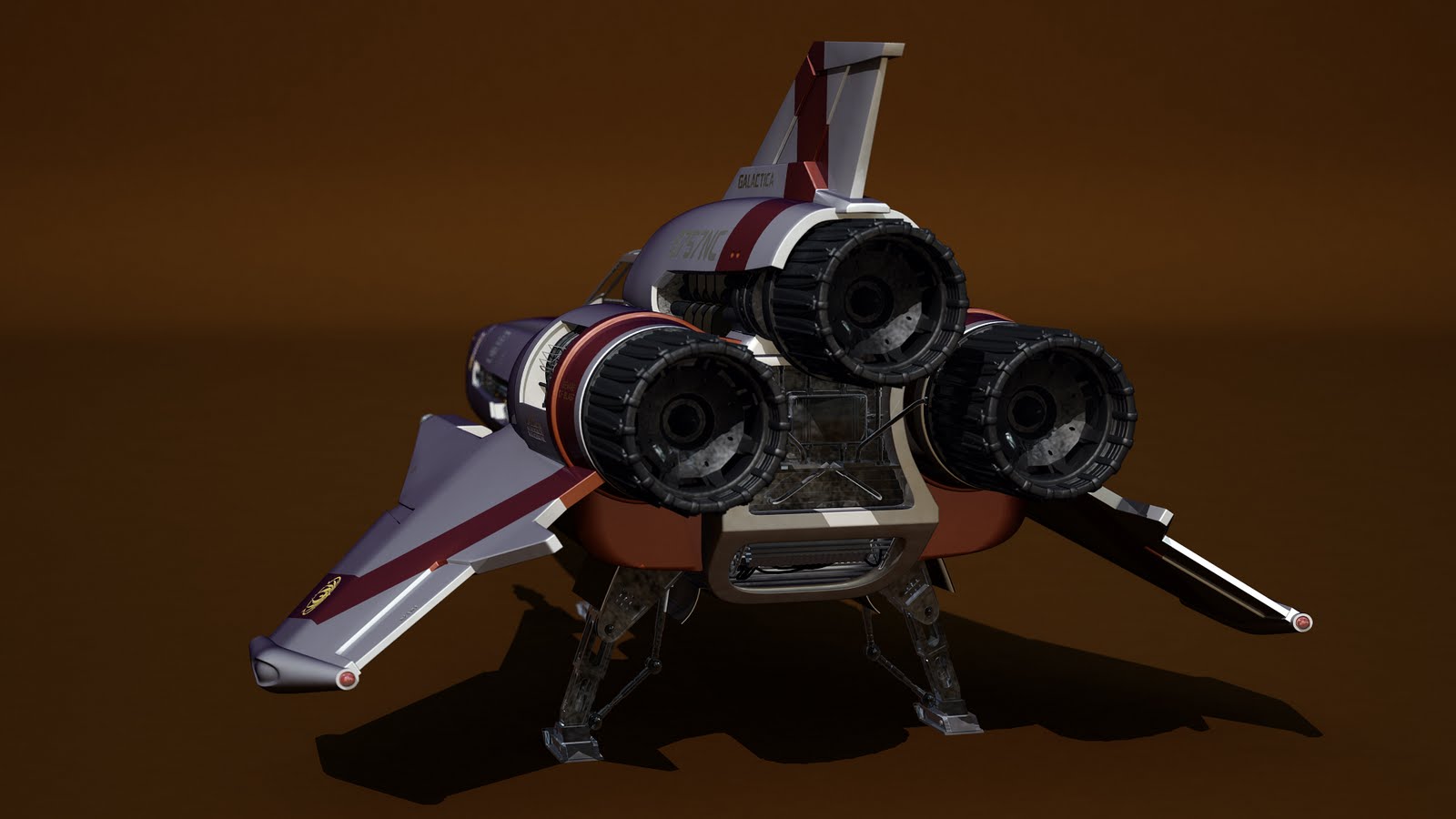
Viper MK II is done

After the Cylon Centurion, the second homage to Battlestar Galactica is done. Viper Mark II is finally over: it is "the Colonial Fleet's primary space superiority fighter / attack craft during the initial Cylon War. 40 years later, they are used by Galactica to effectively combat the Cylons and their more advanced fighters  during the exodus from the Twelve Colonies".


The model is highly detailed and was totally redesigned: browsing the internet, specifically flickr, I found out these terrific photos of the original Starbuck's viper. aharvey2k's hi-res photos were a great start to understand and model all of the details and to extrapolate textures and the original font. I used Maya 2011 Hotfix 2 to model the Viper and Mental Ray to generate some test images:


As for the shaders, I used mi_car_paint_phen to simulate the unique characteristics of a mild car paint. I decreased the weight for the primary specular color and  modified the parameters for the flakes to match the aharvey2k's  photos. A mia_exposure_photographic was plugged into the MR lens shader slot of the camera. This shader is a tone mapper that converts actual pixel luminances (in candela per square meter) into image pixels as seen by a camera, applying camera-related parameters (such as f-stops and shutter times) for the exposure, as well as applying tone mapping that emulates film and camera effects. mib_blackbody light shaders were connected to the color parameters of the light shaders. I used a light probe image to illuminate the viper with measurements of real light. Below a couple of quick render tests.


I made an attempt to plug layered textures into dirt_color and dirt_weight to cover the underlaying paint and clearcoat layers in order to to get variations in the dirt across the surface. The dirt texture was painted over the UV map in Photoshop. The focal length is obviouslly wrong but this attempt helps me to notify some problem: probably I have to decrease the reflections and, in any case, the image should be modified into a compositing package.


Last, but not  least, homage will be the Cylon Raider.

Best regards.

sabato 19 giugno 2010

Fixing GRUB errors on Ubuntu Lucid Lynx 10.04

Sometimes getting GRUB to work properly on our computer can be a painful process. In my experience this difficulty often derives from the complexity of multiple hard drive system. For example, my brother has an old pc with 2 hd drives, (SATA and IDE). The SATA disk is the main bootable drive, the IDE one is used for storage purposes.
It should be easy to get GRUB to work properly on a pc with 2 drives on 2010. Well, it's not.
When setup finishes to install Ubuntu, we reboot the machine and we should be presented with this screen:


Unfortunately it doesn't happen. We could see a lot of different errors, no matter what, the result is that GRUB isn't capable of loading our preferred OS. Anyway there are good news: if the Ubuntu installation went fine, we don't need to install the OS again, we have to fix GRUB, specifically its configuration file.
First of all, a preamble: this guide cannot be exhaustive since there are such different configurations, systems and situations. We need to pay attention to play with hard disk drives. We have to back up all our data (for example a preexisting Windows partition.
So what's the point? The point is a generic way to mount our filesystem, fix GRUB and install it again. Probably we will need additional informations to get GRUB to work properly and fix the issue in the right way, but internet is great and Google is our friend.

So, without further ado, let's get started.
  1. We will use Ubuntu LiveCD to access our fresh install of Ubuntu. So, let's boot Ubuntu LiveCD as usual: we want to try Ubuntu without any change to our box, even though it's has been installed properly.
  2. At this moment we need to retrieve a couple of informations. We have to know the name of the partition where we installed Ubuntu (available as /) and the filesystem type. We can use GParted to retrieve these parameters:


    In the above example,  /dev/sda3 is our root device, the filesystem is ext3. Run the terminal from theUbuntu LiveCD and execute these commands:

     stefano@SERVER:~$ sudo mkdir /mnt/root
     stefano@SERVER:~$ sudo mount -t ext3 /dev/sda3 /mnt/root
     stefano@SERVER:~$ sudo mount -t proc none /mnt/root/proc
     stefano@SERVER:~$ sudo mount -o bind /dev /mnt/root/dev
     stefano@SERVER:~$ sudo chroot /mnt/root /bin/bash
     root@SERVER:~$ cd /boot/grub/
     root@SERVER:~$ nano grub.cfg

  3. nano is a simple terminal-based text editor. The Page Up and Page Down keys, the Arrow keys, and the Insert key and Delete key all work as in most other text editors.
    Now, before continuing this procedure, we have to understand that GRUB uses a different way to classify the hard disk drives: (hdX,Y). More specifically we  have (hdX=drive where Ubuntu has been installed,Y=partition where Ubuntu has been installed-1). sda = 0, sdb = 1 and so on.
    /dev/sda3 is written as (hd0,2) in grub because Y is always one digit less in (hdX,Y).
    We have to find all occurrences of (hdX,Y) and replace them with (hd0,2).
  4. After that, we can save grub.cfg and install again GRUB executing the command:

     root@SERVER:~$ grub-install /dev/sda
This guide is a work in progress so if you find something wrong, please let me know it.

Best regards

giovedì 17 giugno 2010

QWidget: Cannot create a QWidget // Maya exited with status 1

Yesterday I've seen this error, for the first time, using batch rendering with Mental Ray. The problem was a plug-in (Maxwell Render plug-in for Maya 2011) never used in my scene but oddly loaded opening the file. The plug-in could not be unloaded because of a reference to maxwellpreviewdata. If I "forced" Maya to unload the plug-in, I got an error that stated:

Plug- in cannot be unloaded because it defines a MPxData derived type that is still in use.

Uninstalling the plug-in is the easiest thing to do, it's a temporary solution that fixes the problem, allowing Mental Ray to work fine again.
As a matter of fact, if I reinstalled the plug-in, the problem came up again.
Next I tried to delete unknown and locked nodes, running the MEL commands:
  1. lockNode -lock off `ls -type unknown`;
  2. delete `ls -type unknown`;
to clean up the file but it didn't work, Maxwell Render Plug-in was loaded again opening the scene.
The last step I made was a "brute force attack" to the scene not to waste my time.
I saved the scene as Maya Ascii file, opened it with Wordpad, deleted the line:

requires "Maxwell Render 2.0.39"

and saved the ascii file.

It worked, the plug-in isn't loaded opening the file and Mental Ray can melt again my cpu. This solution is very rough and I'd like to find out a more elegant fix.
Anyway I hope to be helpful.

Best regards.

lunedì 14 giugno 2010

Installing Bonus Tools for Maya 2011 [win64] on Windows 7

In my humble opinion, Autodesk should change the way to automate the building of packages for Windows. I've never seen so many errors and requirements to install a very small piece of software like Bonus Tools for Maya.
"Bonus Tools is a free collection of useful Maya scripts and plug-ins. After installing Bonus Tools, users will have a pull-down menu for easy access to the tools that cover all aspects of everyday use: general UI, modeling, animation, texturing, rendering and cloth." 
Cool! Unfortunately installing this piece of software on a fresh install of Windows 7 x64 is very hard, at least for me.
Double click on the msi file and the first problem appears:

"The InstallScript  engine is missing from this machine. If available, please run ISScript.msi, or contact your support personnel for  further assistance."

What's Installscript? It's a system to create Windows setup files:according to InstallShield,, it should keep "customers happy". Actually I'm not happy and Installscript acts like a virus: you can install it, you can't remove it, you have to live with it. No way to uninstall it via Add/Remove Programs or using Windows Installer Clean up.
InstallShield explains here how to determine the version number of the ISScript engine we need, download it, and install it.
Unfortunately  I could not use the procedure explained to determine the version number I needed, so I tried it out myself.
Version 8 works for me.
It seems that installing multiple ISScript versions doesn't affect pc performances.
Ok, another problem:
"Registry Error: Module path is empty. Unable to set up Registry details to configure Bonus Tools." 

Unable to set up Registry: it seems a problem due to system privileges. I ran a dos command prompt as Admin. I navigated to the location of the msi file and typed:

msiexec /i MayaBonusTools2011_win64.msi

This procedure avoids the registry error. Finally Bonus tools have been installed.
Now I have to figure out how to install them on Vista x86. Other kind of problems on Vista.